
From eyewear photographs to organized catalog assets, automatically
Optifashion
Optifashion Studio brings the repetitive steps of eyewear image preparation into one workflow: upload photographs, let AI and eyewear-specific cleanup do the heavy lifting, then review, retry and download organized assets.
16 catalog files per product set
One product shoot in. A complete, organized asset set out.
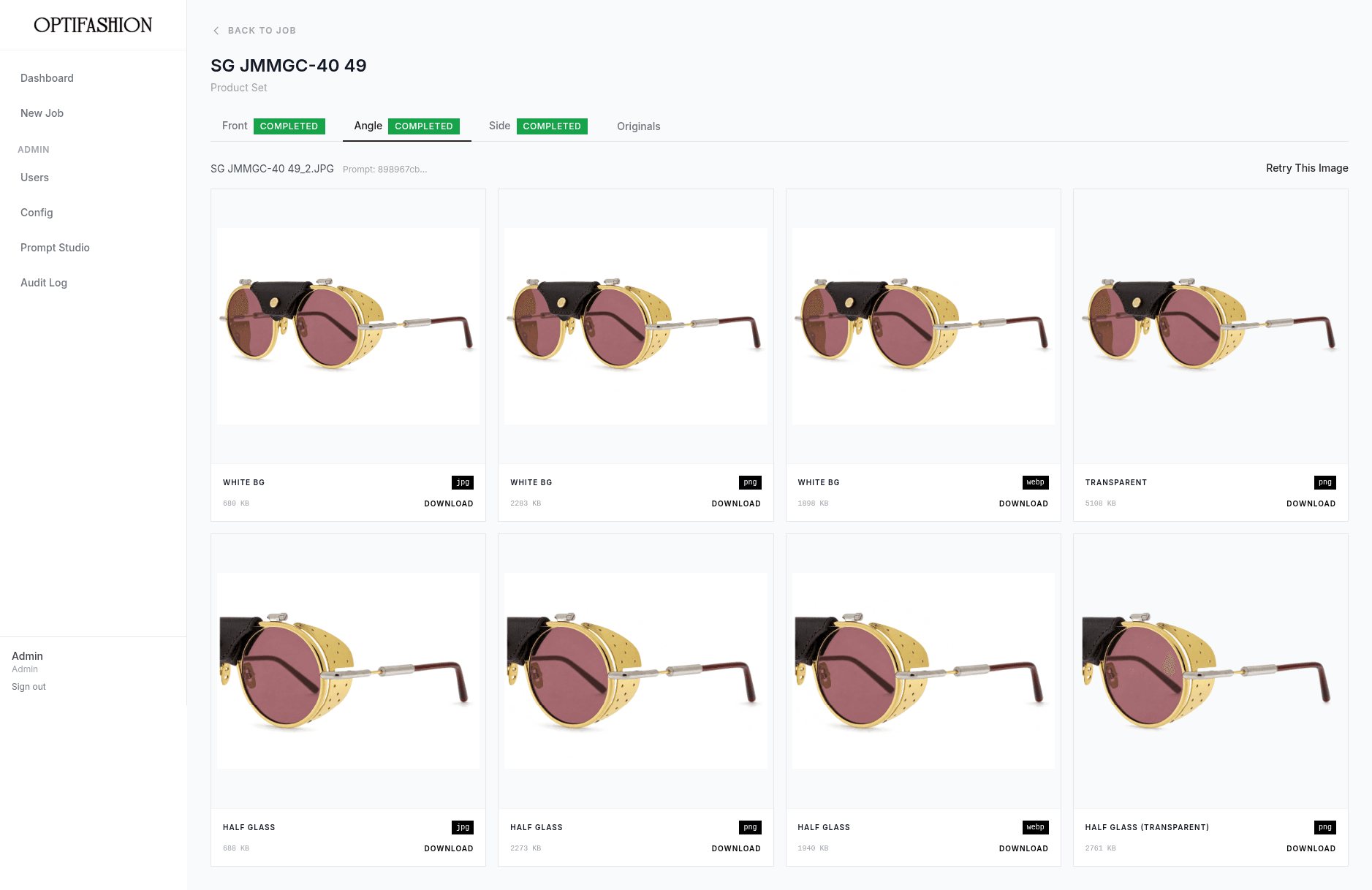
A front, angle and side photograph become 16 standard files: white-background and transparent versions, plus a close-up of the lens and temple arm.
Clean backgrounds without losing the frame.
Clear lenses, thin rims and reflective surfaces are the hardest part of eyewear photography. The workflow is built around them, with image-level review for the exceptions.
Upload, inspect, download
Track every job, open any image, retry just the one that needs it and export a single file or a ZIP.
Controlled and traceable
Role-based access, versioned prompts, audit records and temporary download links keep a shared workspace under control.
- Product type
- Eyewear
- Ways in
- Web upload, FTP inbox
- AI
- Gemini, experimental OpenAI
- Per product set
- 16 standard files
Eyewear is one of the hardest products to photograph for a catalog.
Clear lenses, thin rims, reflective surfaces and narrow temple arms make backgrounds hard to remove cleanly, and every product needs several views and file formats.
Right photo, right product
Front, angle and side views must stay attached to the correct product.
Delicate detail
Thin frames and clear lenses are easily damaged by a crude cutout.
Close-up views
Detail shots must line up across white and transparent versions.
Exceptions at scale
A few unsuitable results should not force a whole batch to be redone.
How a photograph becomes a catalog asset
Two design decisions carry the workflow: one shared pipeline from intake to delivery, and image processing that is built around the shape of eyewear.
Decision 01
Every photograph had to end up with the right product, in every format.
Group photographs by product code and view from the filename, then run each group through one shared pipeline. Slow work happens in background queues, so the dashboard stays responsive, and finished files are delivered into product and format folders, or downloaded individually or as a ZIP.
Architecture Narrative
Photographs arrive by web upload or an FTP inbox and are grouped by product code and view. They go through AI refinement, then background cleanup and detail crops, then a quality check, and finally organized files are delivered.
Architecture Narrative
A refined photo passes through frame and lens protection, then backdrop and shadow cleanup, then one shared detail crop. A quality evaluation either approves the asset or sends it back for a bounded number of retries.
Decision 02
Thin frames and clear lenses are easy to damage when removing a background.
Protect the lens regions and the frame before cleaning the backdrop, tell contact shadows apart from a grey surface, and compute one crop box shared by the white and transparent versions so they always line up. A configurable quality check can log a defect or ask for a retry within a fixed budget.
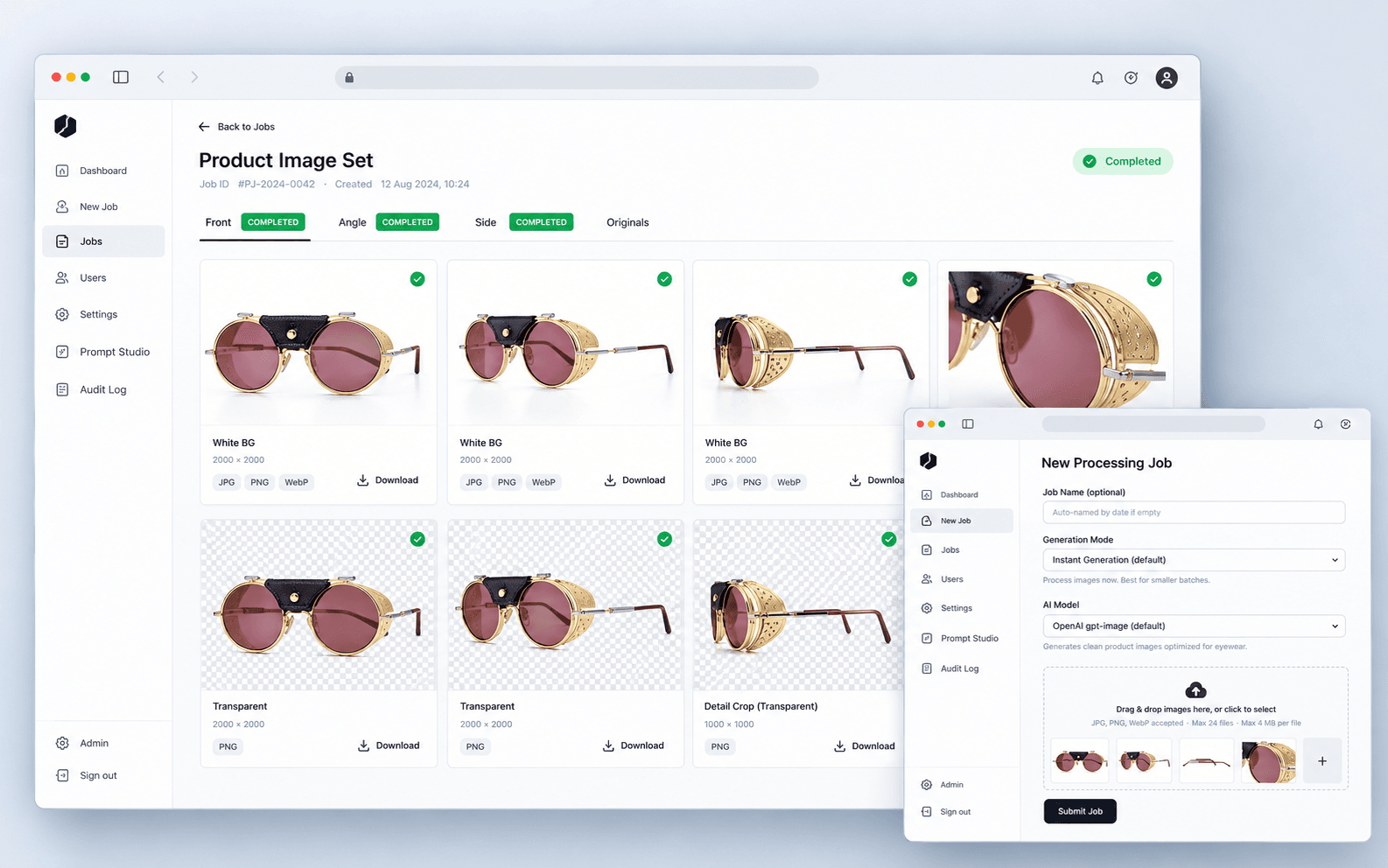
Starting a job takes one screen.
Pick a mode, choose the AI model, drop in the photographs.
Staff name the job (or let it auto-name by date), choose instant or batch generation and an AI model, then drag in JPG, PNG or WebP files named by product code and view.
Two ways to work, one traceable path.
Both routes connect the source photograph, its product group, its processing status and every generated asset.
Upload, review and retry
Staff upload photographs, watch progress, inspect full views and detail crops, and regenerate a single image when needed.
- Progresslive job status
- Retryone image at a time
- Exportsingle file or ZIP
- Alertsemail when a job completes
Drop files, collect results
Photographers place conventionally named files in an inbox. Scheduled workers create the jobs and deliver outputs into product and format folders.
- Intakewaits for uploads to settle
- Failureseligible retries
- Deliveryby product and format
- Revisionsnewest version, same filename
What the workflow produces, and what was verified.
20/20 cleanup checks passed vs 2/20 before
One complete product set
Front, angle and side views generate white-background and transparent assets, plus half-glass detail crops.
Web upload and FTP
Both feed the same processing, storage and delivery path.
Grouped automatically
Filenames carry the product code and view, so grouping needs no manual sorting.
Background cleanup checks passed
On the documented verification set, against 2 of 20 for the earlier method. A targeted historical check, not a platform-wide rate.
Crop accuracy at working size
Reduced-resolution crop geometry stayed within about 6 pixels of full resolution on the documented angle images.
The unit of retry
Regenerate only the image that needs it, and keep the rest of the set.
Specialist where it matters. Familiar everywhere else.
The image work uses purpose-built techniques; the surrounding platform uses mainstream tools that are easy to run and extend.
AI and image processing
Refinement, segmentation, cleanup, shadow analysis and cropping.
Backend
Authenticated API and background processing.
Data and storage
Jobs, products, prompt versions and generated assets.
Workspace
Operations dashboard and deployment.